How to Use Webhooks for Custom Automations
Enterprise-Grade Data Portability
Standard integrations like Slack or Google Sheets are great, but sometimes you need your data to go exactly where your business logic lives. Webhooks are the professional developer's tool of choice for real-time data transfer.
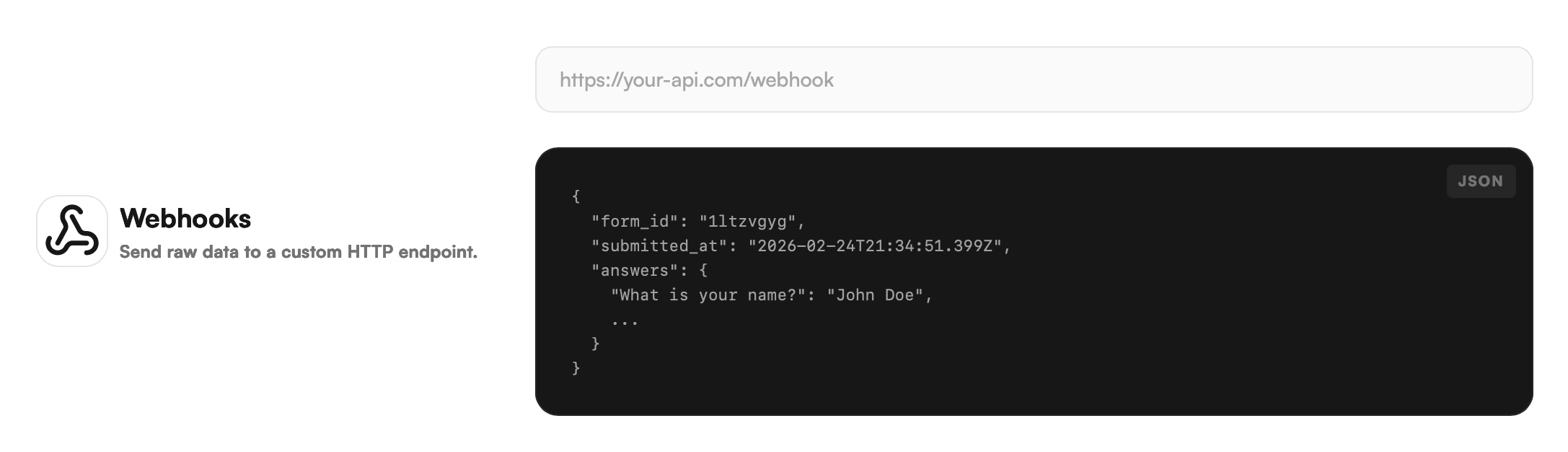
When a respondent submits your form, FlowyForm sends an HTTP POST request containing the response data to a URL of your choosing. This allows you to trigger custom scripts, update your proprietary CRM, or alert your own backend systems instantly.
Step 1: Navigate to the Integrate Tab
Webhooks are managed alongside our other native integrations.
- Open your form in the builder.
- Click on the Integrate icon in the top navigation bar.

Step 2: Set Your Webhook Destination
Once inside the Integrate tab, look for the Webhook URL section at the bottom of the list.
- Click the Watch button (or the URL field) to activate the configuration.
- In the input field provided, paste the Endpoint URL where your server is listening for incoming POST requests.
- Ensure your endpoint is set up to receive JSON data and return a
200 OKstatus to confirm receipt.
Step 3: Test and Monitor
FlowyForm will immediately begin sending data to this URL for every new submission. To verify the connection:
- Fill out a live version of your form.
- Check your server logs to ensure the data was received.
- Monitor the Status in the FlowyForm builder—if your server consistently fails to respond, you may need to check your firewall settings or endpoint logic.
Technical Security Best Practices
To ensure your data remains secure during transit, we recommend the following:
- Use HTTPS: Only use secure
https://URLs for your endpoints to encrypt the data in transit. - Endpoint Validation: Ensure your backend validates the incoming data structure to ensure it matches the expected FlowyForm schema.
- Uptime Monitoring: Since webhooks are real-time, ensure your receiving server has high availability to avoid missing submissions during peak traffic.
Pro-Tip: Debugging Your Webhook
If you are still building your backend and want to see what the data looks like before writing code, use a tool like Webhook.site or Beeceptor. Paste their temporary URL into FlowyForm to see the live data structure the moment you submit a test form!