Collecting Partial Responses
What are Partial Responses?
A partial response occurs when a user starts filling out your form but leaves before reaching the final "Submit" button. Unlike other platforms that require manual "save points," FlowyForm automatically collects data as the user progresses through each field.
This ensures you never lose valuable lead information or feedback just because a respondent got interrupted or changed their mind.
Viewing Your Data
To view your gathered data, navigate to the Results tab in your form dashboard. We categorize your data into two distinct views to help you stay organized.
1. The Sub-Tabs: Complete vs. Partial
Under the Results section, you will see two sub-tabs.
- Complete: This shows every respondent who successfully reached the end of your form.
- Partial: This shows respondents who entered data but did not finish.
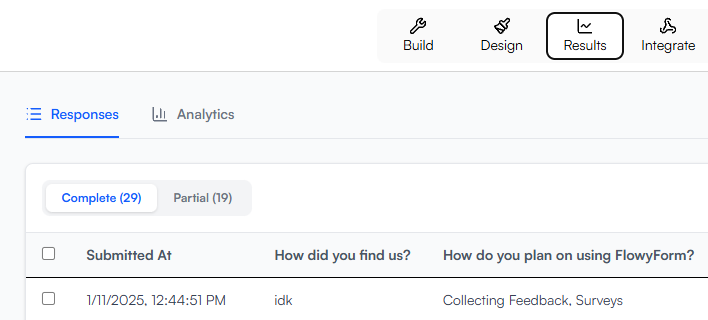
Note: Accessing and viewing data in the Partial sub-tab is a FlowyForm Premium feature. If you are on a standard plan, these responses are still collected in the background, but you will need to upgrade to view the specific details.
2. The Response Table
In both tabs, your data is presented in a clean, filterable table. Each row represents a single user session, showing exactly which questions they answered before dropping off.
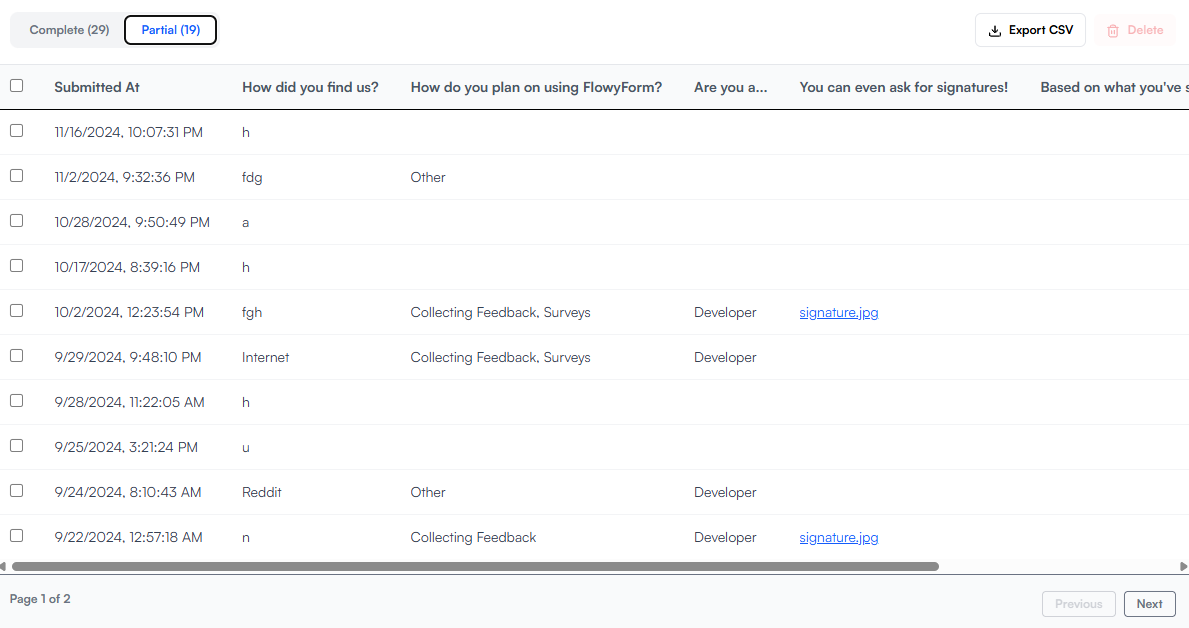
How Partial Responses Count
Every unique partial response counts as one entry. If a user later returns (within the same session) and completes the form, the "Partial" entry is automatically promoted to a "Complete" entry, and it will still only count as one response in total.
Pro-Tip: Reducing Drop-off
If you notice a high number of partial responses in a specific form, check your Analytics tab to see which question is causing users to leave. Often, making a complex question optional or breaking a long form into multiple pages can help convert those partial entries into completed ones.